What are the Tools in the symmetRE MCP?
If you use Claude, ChatGPT, or any AI assistant at work, your next question should be: what is a "tool"? What is an "agent"? And what does the symmetRE MCP actually do with them?

If you use Claude, ChatGPT, or any AI assistant at work, you've probably heard the word "MCP." And even if you haven't, there's a decent chance you've already configured one: they've quietly become the standard way AI connects to the tools you work in.
If you’re following along with the broader conversation about AI, your next questions should be: What is a "tool"? What is an "agent"? And how should you be thinking about them as you're actually using AI in your work?
First things first: What's an agent? What's a tool?
When most people talk about “AI” these days, they’re really talking about LLMs (Large Language Models; Think: ChatGPT). In this context an "agent" is an AI that doesn't just answer questions from memory. It takes steps. It can look things up, run calculations, retrieve live data, and work through a multi-part task the way an analyst would — except in seconds.
Building on this idea, a "tool" is one specific action that an agent can take. Each tool does one thing: check this, find that, pull this number. The agent decides which tools to call, in what order, to get to the answer. These terms are really a way to further personify the way these models work to answer questions and complete tasks.
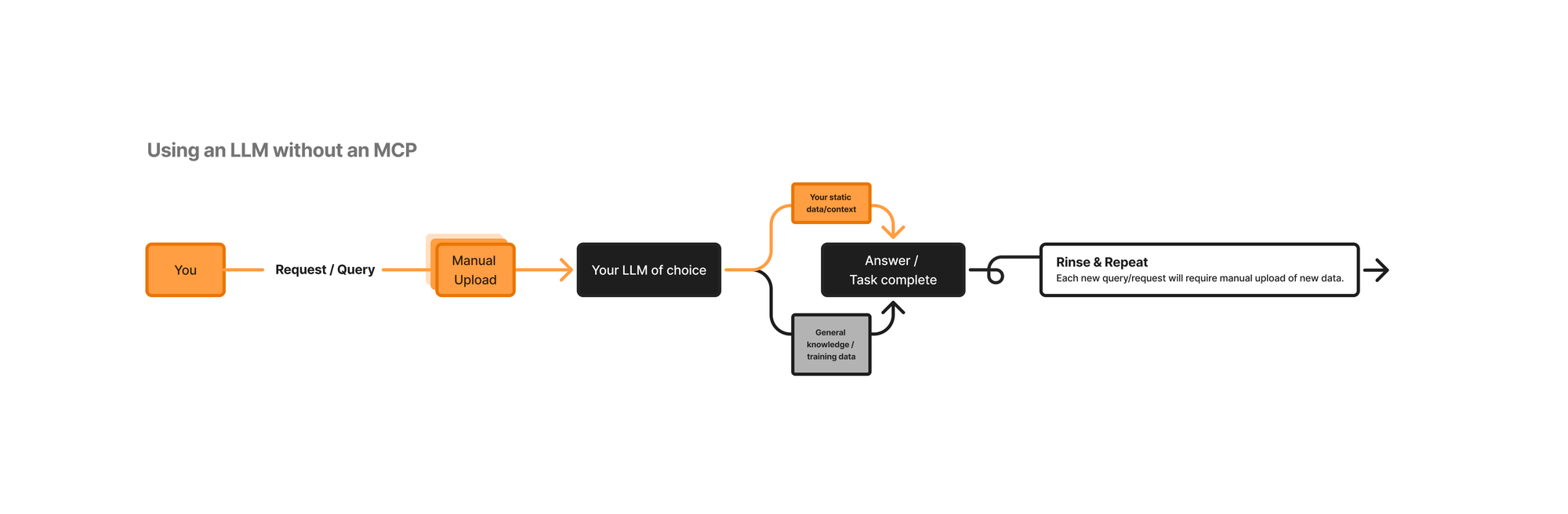
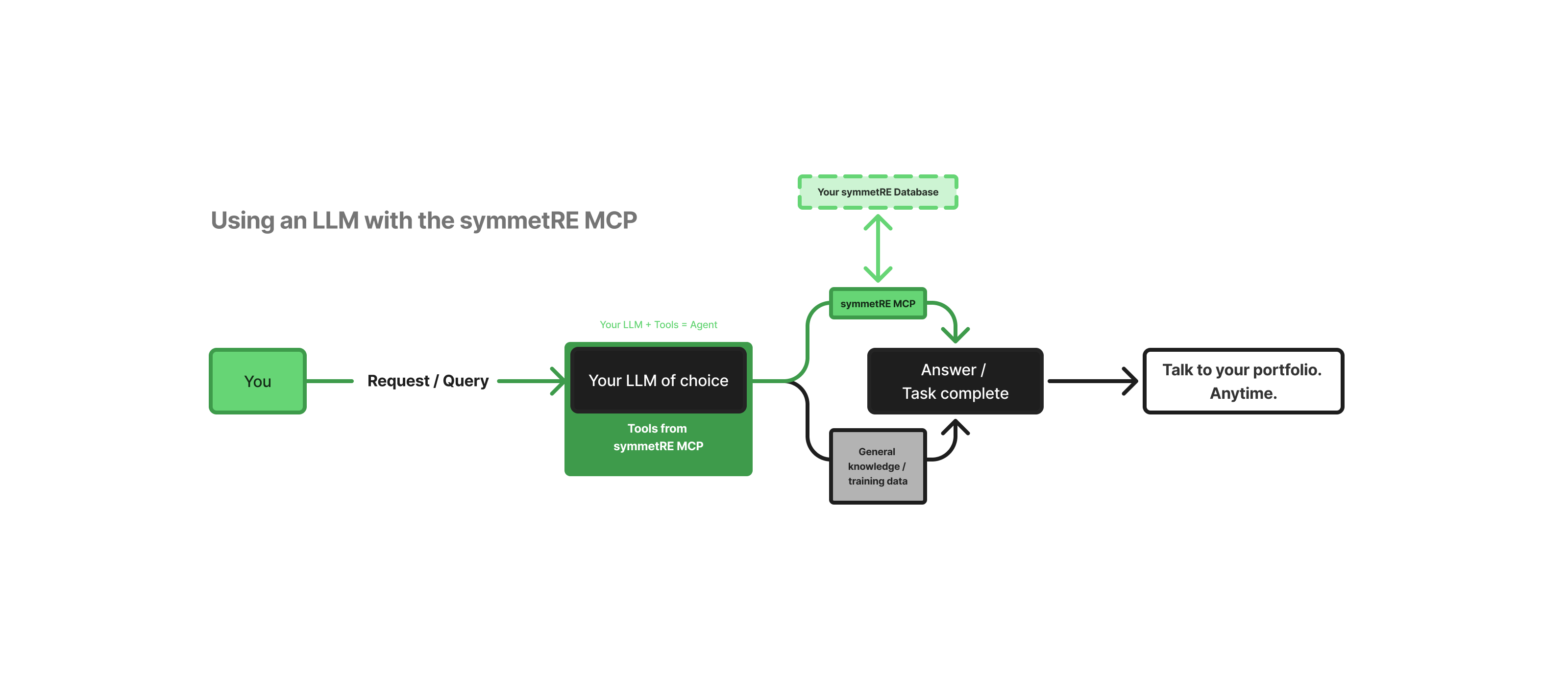
The MCP (Model Context Protocol) is the connection between the AI and your system. The tools are what the agent can actually do once it's in. The images below are reductive, but illustrate the general idea.
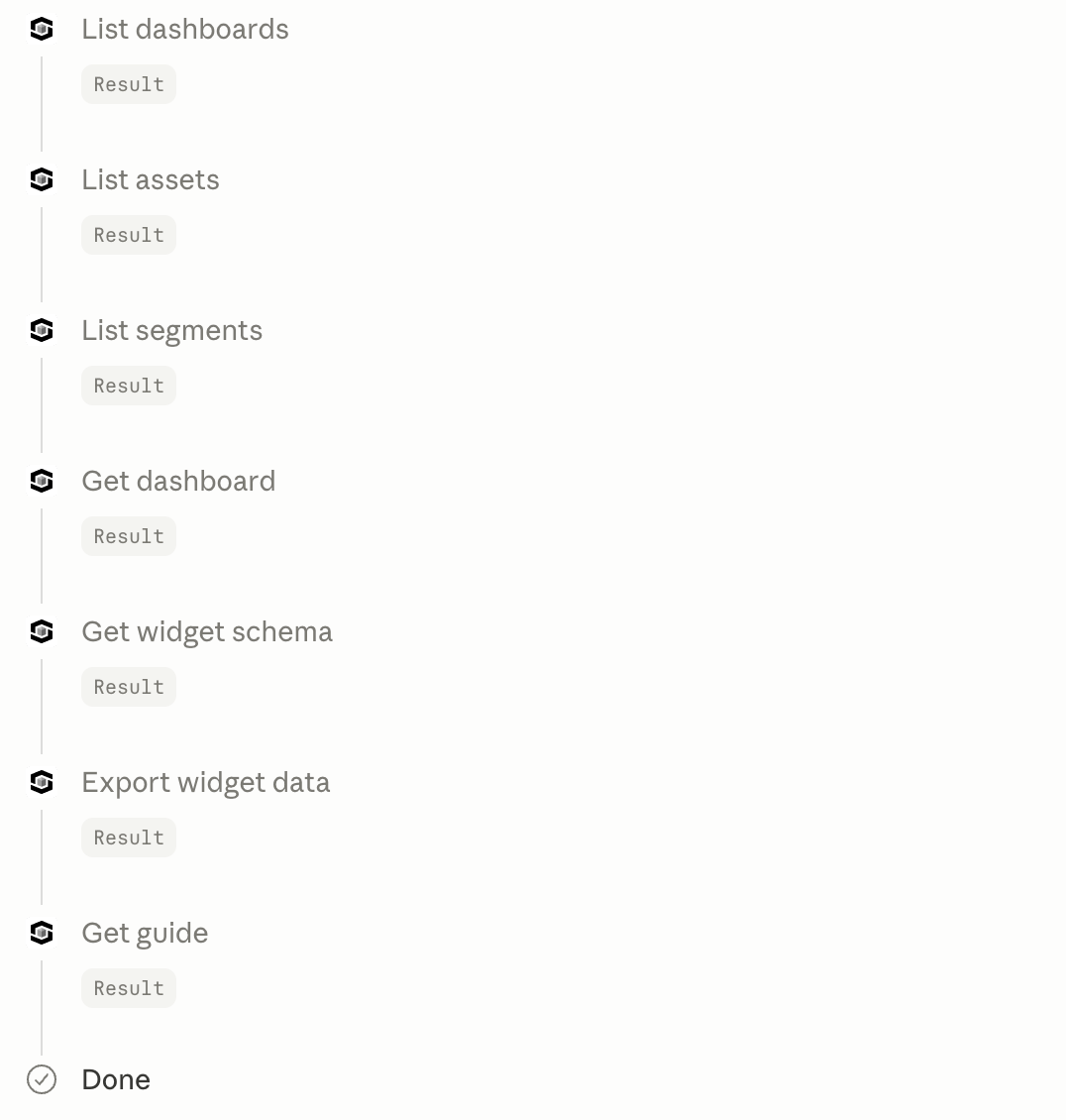
And here's what makes this concrete: when the agent is working, you can watch this process unfold in real-time. Each tool call surfaces as a callout in your conversation — a step-by-step log of what the agent is doing. Ask a portfolio question and you might see it move through three or four tools before it returns an answer. That's not background magic. That's a visible process you can follow.
The core tools in the symmetRE MCP
Here’s an overview of how tools are used in the symmetRE MCP and why we built them out the way we did.
The tools are organized in the sequence the agent actually uses them. It doesn't start by pulling numbers. It starts by understanding your workspace, then finding the right metric, then retrieving the data. This sequence is what makes it reliable: each step sets up the next. Better yet, this process is not static; we are adding and updating tools in the MCP to ensure you’re able to get the most out of your platform data.
Category 1: Context
I.e., Your workspace, configured
Your workspace guide (Get guide) — An optional, per-customer file the agent reads at the start of a session. It maps common questions to the widgets that answer them, and carries client-specific instructions configured for that workspace. When present, the agent loads it first. It's written and maintained per workspace by your CS team through the portal (not a global setting).
Category 2: Discovery
I.e., What exists in your workspace today?
Before the agent can answer any question about your portfolio, it needs to know what it has access to. The following tools give it that foundation.
Your properties (List assets) — Returns every asset in your workspace. The starting point for any property-level question.
Your portfolio groups (List segments) — A segment is a saved grouping of properties: a fund, a region, a portfolio slice. This tool returns every segment configured in your workspace, with the legal entities inside each. A segment is always a curated subset — it is never treated as a stand-in for the full portfolio.
Your dashboards (List dashboards) — Returns every dashboard available in your workspace, and the tabs inside each one. This is how the agent knows what analytical views exist before it opens anything.
Category 3: Navigation
I.e., Where's the specific number?
Once the agent knows what exists, it needs to find the right metric. These tools are the index.
Every metric, indexed (List widgets) — Every chart, table, and KPI card across every dashboard, in a single call. This is how the agent maps a plain-language question (e.g., what's my current occupancy?) to the specific widget that holds the answer.
One dashboard, in full detail (Get dashboard) — Opens a single dashboard and returns its widgets at full depth. The same information as the previous tool, but zoomed into one dashboard and one level deeper.
Category 4: Data
I.e., The actual number
Pull a live figure (Export Widget Tool) — The only tool that returns actual data. Every tool above locates the right widget and scopes the question. This one runs the calculation.
A less purpose-built MCP connection would hand the AI raw API access and let it figure out the rest. The symmetRE MCP gives the agent a structured path: understand the workspace, navigate to the right metric, return the actual number with no guessing in between. That's the difference between an agent that works and one that just sounds like it does.
To learn more about symmetRE, our MCP, or any of the tools purpose-built to help you maximize your portfolio insights, visit www.symmetre.com.